You walk into your hotel room after a long travel day, ready to work, only to find a narrow vanity and a shaky chair. Hotel rooms are built for sleep, not for hitting high-stakes deadlines. Working on one laptop screen while hunched over a low table leads to a sore neck. However, a few tricks can turn that cramped corner into a real office.
If you are struggling to stay productive, you should check out the portable monitor options at Mobile Pixels. Adding a Mobile Pixels portable monitor to your bag gives you the space to work without feeling trapped. This simple upgrade lets you keep references open while you draft your project.
Optimize Your Screen Placement
The biggest challenge in a hotel is the height of the desk compared to your seat. Usually, the desk is too low, which forces you to look down and strains your back.
Elevate for Comfort
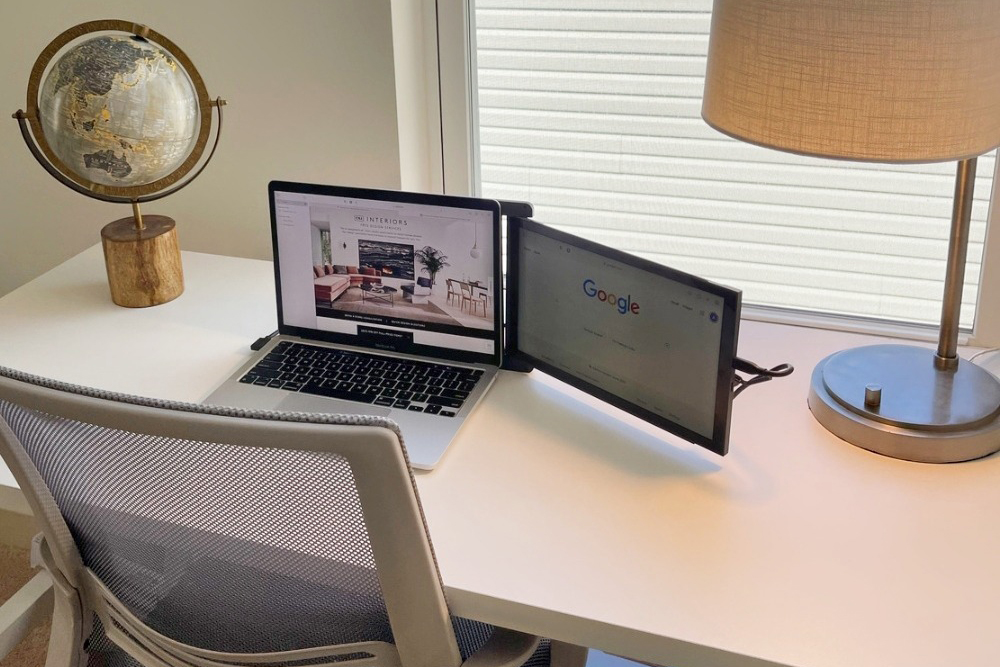
Use the hotel’s coffee tray or a stack of thick pillows to raise your laptop to eye level. If you have an extra screen for a laptop setup, placing it at the same height helps your eyes move naturally between tasks. This keeps your posture straight and stops you from hunching over during long video calls or research sessions.
Using the Hotel TV
If you forgot your portable monitor, you can sometimes use the room’s TV as a second display with an HDMI cable. This works well for looking at large documents or spreadsheets that need a bigger view. Just make sure to check the back of the TV for an open port before you get settled in.
Master Your Cable Management
Hotel desks never have enough outlets in the right places. A mess of wires across your workspace makes it hard to focus and can lead to accidents if you aren’t careful.
Use the “One-Cable” Setup
If you use a portable monitor that pulls power and data through a single USB-C cable, you can save a lot of space. This stops your desk from looking like a pile of tangled cords. It also leaves more room for your notes, coffee, or snacks while you work through your to-do list.
Secure Your Wires
Use the plastic clips on hotel clothes hangers or even a simple hair tie to bundle your charging cables together. This keeps the cords from sliding behind the desk every time you unplug your phone. A tidy desk helps keep your mind clear so you can finish your work faster and get back to relaxing.
Create an Ergonomic Zone
You don’t need to pack a whole office to stay comfortable. You can use what is already in your room to make a setup that supports your body.
Fix Your Seating
Hotel chairs are often too low or lack support. Fold a bathroom towel and place it on the seat to add height, or roll one up and put it behind your lower back for better support. This simple fix can help you work for several hours without feeling stiff when you finally stand up.
Proper Lighting
Hotel rooms are notoriously dim. Move a floor lamp closer to your desk or open the curtains to get as much natural light as possible. Good lighting keeps your eyes from getting tired and makes it easier to stay awake during those late-night work sessions in a new time zone.
Productivity Found in Any Room
Turning a hotel room into a professional office is all about using your space creatively and bringing the right gear. By adjusting your screen height and keeping your cables tidy, you can stay on top of your game anywhere you go. Don’t let a bad desk stop you from being productive; plan ahead and stay productive wherever you travel.